
If you have ever pasted a snippet into functions.php and watched your site change, you have already used a WordPress hook. Hooks are the reason WordPress can power everything from a five-page brochure site to a busy WooCommerce store without anyone editing the core files. Almost every plugin you have installed is, at heart, a collection of functions attached to hooks.
Yet hooks are also where a lot of WordPress code goes wrong. A filter that forgets to return its value can blank out a page, and a callback attached too late never runs at all. Two plugins fighting over the same hook can produce bugs that look random. Understanding how hooks work, and especially the difference between actions and filters, is the single most useful step from “copying snippets” to writing WordPress code you can trust.
This guide is for developers who are getting serious about WordPress, and for site owners who want to understand what their developer is talking about. We will look at where hooks fire during a page load, how actions and filters differ, how priorities decide the order, how to create your own hooks, and the mistakes I see most often when reviewing WordPress code.
In this article
What hooks are and why they exist
A hook is a named point in the WordPress code where it pauses and asks: “Does anyone want to do something here?” WordPress core, themes and plugins are full of these named points. Your code can register a function, called a callback, against a hook name. When WordPress reaches that point, it runs every callback registered for it.
This design solves a real problem. WordPress updates several times a year. If you changed core files to add a feature, the next update would wipe out your change. Hooks give you official, stable places to plug in your behaviour from the outside, in a theme or a plugin, so updates keep working and your customizations survive.
There are two kinds of hooks, and the difference matters:
- Actions let you do something at a specific moment: send an email when a post is published, add a script to the page, register a custom post type.
- Filters let you change a value as it passes through: modify a post title before it is displayed, change the excerpt length, adjust a price.
Under the hood both use the same machinery. Internally, WordPress stores actions as a special kind of filter. But they are used very differently, and mixing them up is the root of many bugs.
Where hooks fire during a page load
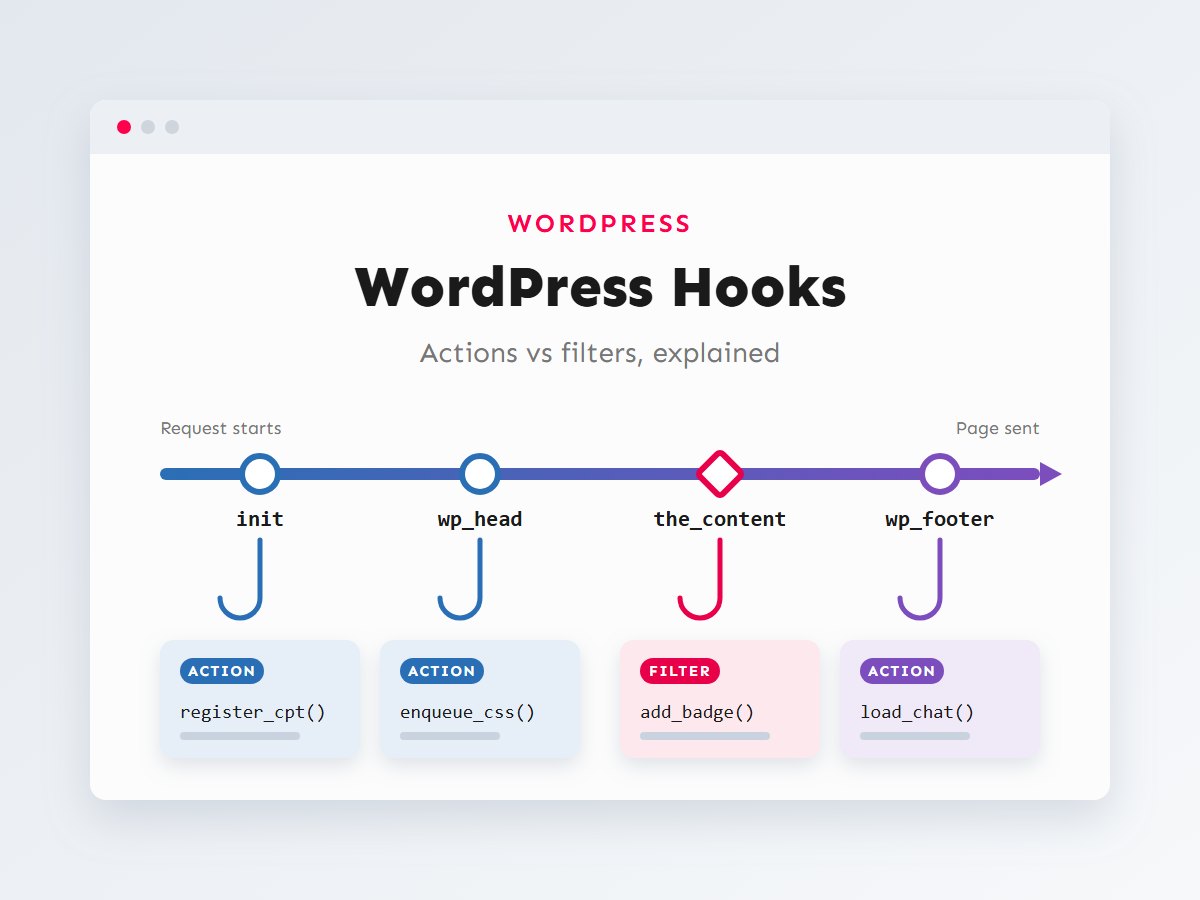
Every front-end request runs through the same sequence: WordPress loads, works out what was requested, runs the query, renders the template and finishes. Hooks fire at each stage, and timing is everything. If you attach a callback to a hook that has already fired, it simply never runs, with no error and no warning.
A few practical rules fall out of this timeline:
- Register post types and taxonomies on
init. Earlier and some WordPress APIs are not ready; later and rewrite rules and admin menus miss them. - Use conditional tags such as
is_single()onwpor later. Before the main query runs, WordPress does not yet know what page it is showing. - Redirect on
template_redirect. Once output has started, headers cannot be sent andwp_redirect()fails. - Load CSS and JavaScript with
wp_enqueue_scripts, which fires duringwp_head, rather than echoing tags directly.
The admin area has its own sequence (admin_init, admin_menu, admin_enqueue_scripts and so on), and REST API requests have theirs (rest_api_init). The principle is the same everywhere: know when your hook fires.
Actions vs filters
The easiest way to keep them apart: an action is an event, a filter is a pipeline. With an action, WordPress tells you something is happening and you react. With a filter, WordPress hands you a value, you hand back a (possibly changed) value, and WordPress carries on using whatever you returned.
Using an action
You attach a callback to an action with add_action(). Here, a site owner gets an email whenever a new post is published, a common request on multi-author sites:
<?php
/**
 * Email the site admin when a post is published for the first time.
 */
function fbm_notify_on_publish( $new_status, $old_status, $post ) {
	if ( 'publish' !== $new_status || 'publish' === $old_status || 'post' !== $post->post_type ) {
		return;
	}

	wp_mail(
		get_option( 'admin_email' ),
		sprintf( 'New post published: %s', $post->post_title ),
		get_permalink( $post )
	);
}
add_action( 'transition_post_status', 'fbm_notify_on_publish', 10, 3 );
Notice the callback returns nothing useful. It just does its job. The last two arguments to add_action() are the priority (10) and the number of arguments the callback wants to receive (3). We will come back to both.
Using a filter
Filters use add_filter(), and the callback must return a value. This example shortens automatic excerpts and swaps the default “[…]” for a cleaner ending:
<?php
// Shorter excerpts: 25 words instead of the default 55.
function fbm_excerpt_length( $length ) {
	return 25;
}
add_filter( 'excerpt_length', 'fbm_excerpt_length' );

// Replace "[…]" with a simple ellipsis.
function fbm_excerpt_more( $more ) {
	return '…';
}
add_filter( 'excerpt_more', 'fbm_excerpt_more' );
A slightly more realistic filter: adding a “Reading time” line to the top of single blog posts using the_content. Note the guards, so it only runs on the main post content, not in widgets, feeds or excerpts:
<?php
function fbm_add_reading_time( $content ) {
	if ( ! is_singular( 'post' ) || ! in_the_loop() || ! is_main_query() ) {
		return $content; // Always hand the value back unchanged.
	}

	$words   = str_word_count( wp_strip_all_tags( $content ) );
	$minutes = max( 1, (int) ceil( $words / 225 ) );

	$badge = sprintf(
		'<p class="reading-time">%s</p>',
		esc_html( sprintf( '%d min read', $minutes ) )
	);

	return $badge . $content;
}
add_filter( 'the_content', 'fbm_add_reading_time' );| Aspect | Action | Filter |
|---|---|---|
| Purpose | Do something at a moment | Change a value |
| Register with | add_action() | add_filter() |
| Fired by | do_action() | apply_filters() |
| Return value | Ignored | Required: becomes the new value |
| Should it echo output? | Sometimes (e.g. wp_footer) | Almost never; return instead |
| Typical examples | init, save_post, wp_enqueue_scripts | the_content, the_title, excerpt_length |
Priorities and accepted arguments
Often several callbacks are attached to the same hook: some by WordPress core, some by your theme, some by each plugin. Priority decides the order. Lower numbers run first, the default is 10, and callbacks with the same priority run in the order they were added. Because plugins usually load before the theme, a plugin’s callback at priority 10 normally runs before the theme’s callback at priority 10.
Priorities matter most with filters, because a later callback sees the result of every earlier one. If another plugin changes the title at priority 10 and you want to change its result, attach your filter at a higher number such as 20. If you want to change the value before others touch it, use a lower number.
The fourth parameter, $accepted_args, tells WordPress how many arguments to pass to your callback. It defaults to 1, so if the hook provides extra context you need to ask for it explicitly:
<?php
// 'the_title' passes two arguments: the title and the post ID.
function fbm_mark_featured_titles( $title, $post_id ) {
	if ( is_admin() || ! get_post_meta( $post_id, '_fbm_featured', true ) ) {
		return $title;
	}
	return '★ ' . $title;
}
add_filter( 'the_title', 'fbm_mark_featured_titles', 20, 2 ); // priority 20, 2 arguments
Forgetting the 2 here causes a fatal “too few arguments” error in modern PHP, because WordPress passes only the title to a function that requires two parameters.
Removing and replacing callbacks
Sometimes the best customization is taking something away: an emoji script you do not need, a plugin’s notice, or a parent theme’s footer credit. remove_action() and remove_filter() do this, but they have two strict requirements:
- Match exactly. The hook name, the callback and the priority must be identical to how it was added.
- Remove it after it was added, but before the hook fires. If a parent theme adds a callback in its
functions.php, your child theme’sfunctions.phpruns first, so you have to wait (for example untilafter_setup_themeorinit) before removing it.
<?php
// Remove WordPress's emoji detection script and styles.
function fbm_disable_emojis() {
	remove_action( 'wp_head', 'print_emoji_detection_script', 7 ); // Same priority core used.
	remove_action( 'wp_print_styles', 'print_emoji_styles' );
}
add_action( 'init', 'fbm_disable_emojis' );

// Removing a callback a parent theme added: wait until the theme has loaded.
function fbm_remove_parent_credit() {
	remove_action( 'parent_theme_footer', 'parent_theme_credit_link', 20 );
}
add_action( 'after_setup_theme', 'fbm_remove_parent_credit', 20 );
Removing callbacks that plugins registered as object methods (array( $this, 'method' )) is harder because you need the same object instance. Well-written plugins store their main instance somewhere accessible (for example a static instance() method) precisely so others can do this. If a plugin uses anonymous functions, its callbacks generally cannot be removed cleanly. That is a good reason to avoid closures for hooks in code that others will extend.
Creating your own hooks
Hooks are not just something you consume. When you write a theme or plugin, adding your own hooks makes it extensible. Other developers, or you in six months, can change its behaviour without editing its files. It costs one line per hook.
<?php
// Inside your plugin: a filter so others can change the query, and an action after output.
function fbm_render_team_members() {
	$args = apply_filters(
		'fbm_team_query_args',
		array(
			'post_type'      => 'fbm_team_member',
			'posts_per_page' => 12,
			'orderby'        => 'menu_order',
			'order'          => 'ASC',
		)
	);

	$team = new WP_Query( $args );

	echo '<div class="fbm-team">';
	while ( $team->have_posts() ) {
		$team->the_post();
		printf( '<h3>%s</h3>', esc_html( get_the_title() ) );
	}
	echo '</div>';
	wp_reset_postdata();

	do_action( 'fbm_after_team_members', $team );
}

// Elsewhere (a theme or another plugin): show only 6 members, no edits to the plugin.
add_filter(
	'fbm_team_query_args',
	function ( $args ) {
		$args['posts_per_page'] = 6;
		return $args;
	}
);
Some conventions worth following:
- Prefix hook names with your plugin or theme slug (
fbm_,woocommerce_) to avoid collisions. - Pass useful context. A filter on a price is far more useful if it also receives the product and the cart.
- Document your hooks with a docblock (
@param,@since), the same way WordPress core does. - Treat hook names as public API. Once people depend on them, renaming one is a breaking change.
Common mistakes and how to avoid them
These are the hook-related bugs I run into most often when taking over or reviewing WordPress projects.
1. A filter that does not return the value
This is the classic. A filter callback that only returns inside an if, or echoes instead of returning, makes the filtered value null. On the_content that means blank posts across the whole site.
<?php
// ✗ Wrong: returns nothing when the condition is false.
add_filter( 'the_content', function ( $content ) {
	if ( is_single() ) {
		return $content . '<p>Thanks for reading!</p>';
	}
} );

// ✓ Right: every path returns the value.
add_filter( 'the_content', function ( $content ) {
	if ( is_single() ) {
		$content .= '<p>Thanks for reading!</p>';
	}
	return $content;
} );
2. Hooking too late (or too early)
Adding a wp_head callback from inside a template file, registering a post type on wp_loaded, or calling is_page() inside plugins_loaded: each of these silently fails because the timing is wrong. When something “just doesn’t run”, check Figure 1 first.
3. Echoing inside a filter
Output from a filter appears wherever the filter happens to run, often at the very top of the page or inside an HTML attribute. Build a string and return it. If you genuinely need to print, you probably want an action.
4. Expensive work on hooks that run constantly
init runs on every request, including admin pages, AJAX and REST calls. the_title can run dozens of times per page. Running remote API calls or heavy database queries there slows the whole site. Check conditions early and return, and cache results with transients. If speed is a concern, my WordPress speed optimization checklist covers how to find these bottlenecks.
5. Infinite loops with save_post
Calling wp_update_post() inside a save_post callback triggers save_post again, and again. Remove your callback before updating and add it back afterwards, or update the data with update_post_meta() instead.
<?php
function fbm_sync_subtitle( $post_id ) {
	if ( wp_is_post_revision( $post_id ) || ( defined( 'DOING_AUTOSAVE' ) && DOING_AUTOSAVE ) ) {
		return;
	}

	remove_action( 'save_post', 'fbm_sync_subtitle' ); // Prevent the loop.
	wp_update_post(
		array(
			'ID'           => $post_id,
			'post_excerpt' => get_post_meta( $post_id, 'subtitle', true ),
		)
	);
	add_action( 'save_post', 'fbm_sync_subtitle' );
}
add_action( 'save_post', 'fbm_sync_subtitle' );
6. Generic function names
A callback named add_scripts() or custom_excerpt() will eventually collide with another plugin and cause a fatal “cannot redeclare function” error. Prefix every function, or use namespaces or classes.
Where should this code live?
Snippets that change how the site looks belong in a child theme. Snippets that change how the site works (notifications, data, integrations) belong in a small custom plugin, so they survive a theme change. I explain the setup in How to Build a Custom WordPress Plugin the Right Way.
How to find the right hook
WordPress core alone has well over a thousand hooks, and plugins such as WooCommerce add hundreds more. You do not need to memorize them. You need a reliable way to find the right one:
- The official Code Reference at developer.wordpress.org lists every core hook with its parameters and the file where it fires.
- Read the source. Search the plugin or theme folder for
do_action(andapply_filters(near the output you want to change. It is the fastest way to see exactly what each hook passes. - Query Monitor. This free debugging plugin shows the hooks that fired on the current page and the callbacks attached to each, with priorities. It is invaluable when two plugins clash.
- Plugin documentation. WooCommerce, Yoast and other large plugins document their hooks. My guide to WooCommerce customization walks through the checkout hooks in detail.
When you have a choice of hooks, prefer the most specific one. save_post_product is better than save_post plus a post type check, and a template-specific hook is better than filtering all of the_content. Specific hooks run less often and make your intent obvious.
Key takeaways
- Actions run code at a moment; filters receive a value and must return it.
- Timing matters: a callback added after its hook fires never runs. Register content types on
init, redirect ontemplate_redirect. - Lower priority numbers run first; the default is 10. Ask for extra arguments with
$accepted_args. - To remove a callback, match its name, callback and priority exactly, and do it after it was added.
- Add your own prefixed, documented hooks so your code can be extended without being edited.
Hooks are what make WordPress so adaptable. Once actions and filters click, you stop fighting the platform and start working with it, and you will find a clean, update-safe way to make almost any change. If you have a WordPress customization in mind and would like it built properly, get in touch and tell me about your project, or see the services I offer.