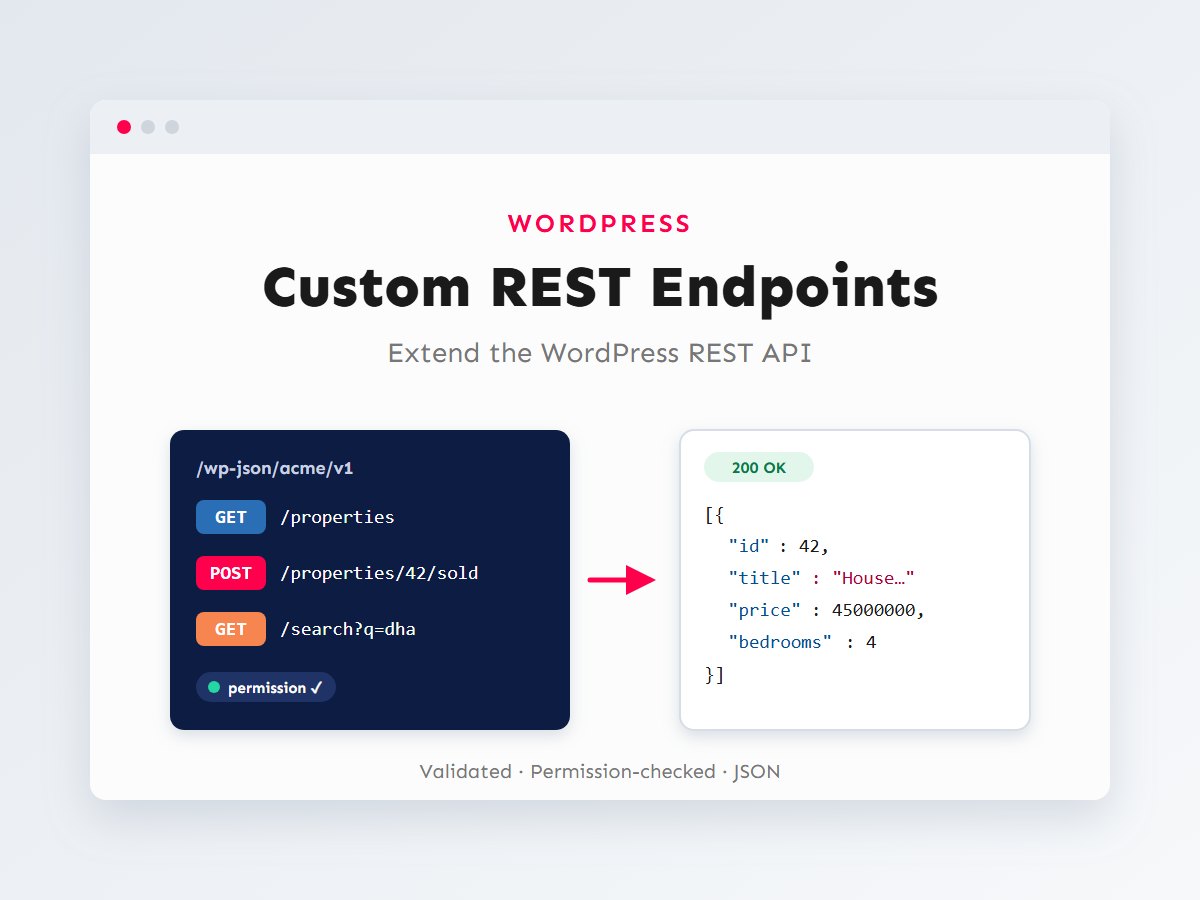

Every modern WordPress site ships with a REST API. Posts, pages, users and media are all available as JSON at /wp-json/. It’s what powers the block editor, and it’s how JavaScript frontends, mobile apps and other systems talk to WordPress.
The built-in routes are generic, though. Sooner or later a project needs something specific: a “featured properties” feed shaped exactly for a React component, a lightweight endpoint for a live search box, or a secure way for an external system to push data in. In this guide I’ll show how I build custom REST endpoints properly, with validation, sanitization and permission checks, and how to call them from JavaScript.
In this article
How a REST request flows through WordPress
A REST route has three parts: a namespace (like acme/v1, which also versions your API), a route (like /properties) and one or more HTTP methods. When a request arrives, WordPress runs it through a fixed pipeline before your code ever sees it.
This pipeline is the main reason to use the REST API instead of a hand-rolled admin-ajax.php handler. You declare the rules once, and WordPress enforces them consistently, with proper status codes and error messages in JSON.
Your first custom endpoint
Routes are registered with register_rest_route() on the rest_api_init hook. This read-only endpoint returns a compact list of properties shaped for a frontend listing component:
<?php
add_action( 'rest_api_init', 'acme_register_routes' );

function acme_register_routes() {
	register_rest_route(
		'acme/v1',
		'/properties',
		array(
			'methods'             => WP_REST_Server::READABLE, // GET
			'callback'            => 'acme_get_properties',
			'permission_callback' => '__return_true',          // Public, read-only data.
			'args'                => acme_property_query_args(),
		)
	);
}

function acme_get_properties( WP_REST_Request $request ) {
	$query = new WP_Query(
		array(
			'post_type'      => 'property',
			'posts_per_page' => $request['per_page'],
			'paged'          => $request['page'],
			'meta_query'     => array(
				array(
					'key'     => 'acme_bedrooms',
					'value'   => $request['bedrooms'],
					'compare' => '>=',
					'type'    => 'NUMERIC',
				),
			),
		)
	);

	$items = array_map(
		function ( $post ) {
			return array(
				'id'       => $post->ID,
				'title'    => get_the_title( $post ),
				'url'      => get_permalink( $post ),
				'price'    => (int) get_post_meta( $post->ID, 'acme_price', true ),
				'bedrooms' => (int) get_post_meta( $post->ID, 'acme_bedrooms', true ),
				'image'    => get_the_post_thumbnail_url( $post, 'medium' ),
			);
		},
		$query->posts
	);

	$response = new WP_REST_Response( $items, 200 );
	$response->header( 'X-WP-Total', (string) $query->found_posts );
	$response->header( 'X-WP-TotalPages', (string) $query->max_num_pages );
	return $response;
}
Visit /wp-json/acme/v1/properties?bedrooms=3 and you get clean JSON with only the fields your frontend needs. That is often much smaller than the default /wp/v2/ response. The WP_REST_Response object lets you set the status code and headers, following the same pagination headers core uses. (The property post type and its fields come from my guide to custom post types and custom fields.)
Validating and sanitizing arguments
The args array describes every parameter the endpoint accepts. WordPress uses it to reject invalid input, fill in defaults and clean values before your callback runs, so the callback can trust what it receives.
function acme_property_query_args() {
	return array(
		'bedrooms' => array(
			'description' => 'Minimum number of bedrooms.',
			'type'        => 'integer',
			'default'     => 0,
			'minimum'     => 0,
			'maximum'     => 20,
		),
		'per_page' => array(
			'type'    => 'integer',
			'default' => 12,
			'minimum' => 1,
			'maximum' => 50, // Never let clients request unlimited rows.
		),
		'page'     => array(
			'type'    => 'integer',
			'default' => 1,
			'minimum' => 1,
		),
		'sort'     => array(
			'type'    => 'string',
			'enum'    => array( 'price_asc', 'price_desc', 'newest' ),
			'default' => 'newest',
		),
	);
}
When you declare a type, WordPress automatically validates and sanitizes against that JSON-schema style definition. ?bedrooms=abc or ?per_page=5000 gets a 400 response with a readable error, and your callback never runs. For rules a schema can’t express, add your own validate_callback (return true or a WP_Error) and sanitize_callback to a parameter.
Always cap list sizes
A public endpoint without a maximum on per_page lets anyone ask for thousands of posts in one request. That’s an easy way to overload a database. Set sensible limits on every list endpoint.
Permissions: who may call it?
Every route needs a permission_callback. Since WordPress 5.5, leaving it out triggers a “doing it wrong” notice, because a forgotten permission check is one of the most common REST security mistakes.
- Public, read-only data that’s already visible on the site:
__return_trueis acceptable, and it states the intent explicitly. - Anything that creates, changes or deletes data, or returns private information: check a capability with
current_user_can(). Never use__return_truefor writes. - Object-level checks: if the route edits a specific post, check
current_user_can( 'edit_post', $id ), not just a general role.
Return true to allow, or false / a WP_Error to deny. WordPress then responds with 401 for logged-out users or 403 for logged-in users without the right capability.
An endpoint that writes data
Here’s a POST route that lets a logged-in agent mark a property as sold. It combines everything above: a typed URL parameter, an object-level permission check and a proper error when the post doesn’t exist.
register_rest_route(
	'acme/v1',
	'/properties/(?P<id>\d+)/sold',
	array(
		'methods'             => WP_REST_Server::CREATABLE, // POST
		'callback'            => 'acme_mark_property_sold',
		'permission_callback' => function ( WP_REST_Request $request ) {
			return current_user_can( 'edit_post', (int) $request['id'] );
		},
		'args'                => array(
			'id'         => array(
				'type'     => 'integer',
				'required' => true,
			),
			'sold_price' => array(
				'type'     => 'integer',
				'minimum'  => 0,
				'required' => true,
			),
		),
	)
);

function acme_mark_property_sold( WP_REST_Request $request ) {
	$post = get_post( $request['id'] );

	if ( ! $post || 'property' !== $post->post_type ) {
		return new WP_Error( 'acme_not_found', 'Property not found.', array( 'status' => 404 ) );
	}

	update_post_meta( $post->ID, 'acme_sold_price', $request['sold_price'] );
	wp_set_object_terms( $post->ID, 'sold', 'property_status' );

	return new WP_REST_Response(
		array(
			'id'     => $post->ID,
			'status' => 'sold',
		),
		200
	);
}
Returning a WP_Error with a status is the idiomatic way to fail. WordPress converts it into a JSON error with that HTTP code, which JavaScript clients can handle cleanly.
Authentication options
Permission checks like current_user_can() only work if WordPress knows who is making the request. How it knows depends on where the request comes from:
Cookie authentication with a nonce is for JavaScript running on the WordPress site itself. The browser already sends the login cookie; the X-WP-Nonce header proves the request came from your page and not from a malicious site (CSRF protection). Without the nonce, WordPress treats the request as logged-out, even if the cookie is present.
Application Passwords, built into core since WordPress 5.6, are for external systems: an ERP pushing stock levels, or a Next.js server fetching drafts. Each user can create named passwords in their profile and revoke them individually. They’re sent with HTTP Basic authentication, so HTTPS is mandatory.
Calling your endpoint from JavaScript
First, pass the REST URL and a nonce to your script when you enqueue it:
add_action( 'wp_enqueue_scripts', function () {
	wp_enqueue_script( 'acme-listings', get_stylesheet_directory_uri() . '/js/listings.js', array(), '1.0', array( 'strategy' => 'defer' ) );

	wp_localize_script(
		'acme-listings',
		'acmeApi',
		array(
			'root'  => esc_url_raw( rest_url( 'acme/v1/' ) ),
			'nonce' => wp_create_nonce( 'wp_rest' ),
		)
	);
} );
Then use plain fetch(). Here’s a reading request and a writing one, both with error handling:
// listings.js
async function loadProperties( bedrooms = 0 ) {
	const url = new URL( acmeApi.root + 'properties' );
	url.searchParams.set( 'bedrooms', bedrooms );

	const response = await fetch( url );
	if ( ! response.ok ) {
		const error = await response.json();
		throw new Error( error.message );
	}

	const total = response.headers.get( 'X-WP-Total' );
	const properties = await response.json();
	return { total, properties };
}

async function markSold( id, soldPrice ) {
	const response = await fetch( `${ acmeApi.root }properties/${ id }/sold`, {
		method: 'POST',
		headers: {
			'Content-Type': 'application/json',
			'X-WP-Nonce': acmeApi.nonce,
		},
		body: JSON.stringify( { sold_price: soldPrice } ),
	} );

	if ( ! response.ok ) {
		const error = await response.json(); // { code, message, data: { status } }
		throw new Error( error.message );
	}
	return response.json();
}
Inside the block editor or a React-based admin screen, the @wordpress/api-fetch package does the same with less code: it adds the nonce and root URL automatically. I use it in my guide to building custom Gutenberg blocks. For a modern-JavaScript refresher, see modern JavaScript for WordPress and Shopify developers.
Adding fields to existing routes
Sometimes you don’t need a new endpoint at all, just one more field on an existing response. register_rest_field() adds computed data to core routes such as /wp/v2/posts:
add_action( 'rest_api_init', function () {
	register_rest_field(
		'post',
		'reading_time',
		array(
			'get_callback' => function ( $post ) {
				$words = str_word_count( wp_strip_all_tags( get_post_field( 'post_content', $post['id'] ) ) );
				return max( 1, (int) ceil( $words / 200 ) );
			},
			'schema'       => array(
				'description' => 'Estimated reading time in minutes.',
				'type'        => 'integer',
				'context'     => array( 'view', 'embed' ),
			),
		)
	);
} );
For plain post meta, you often don’t need even this: registering the meta with show_in_rest => true exposes it under the meta key automatically. Choose the lightest tool that does the job:
| You need… | Use |
|---|---|
| A stored meta field in core responses | register_post_meta() with show_in_rest |
| A computed value in core responses | register_rest_field() |
| A different response shape, combined data or an action | register_rest_route() |
| A full CRUD resource with schema and links | A controller class extending WP_REST_Controller |
Making endpoints production-ready
An endpoint that works in development is only half done. Before I ship one, I go through a short checklist that covers testing, versioning and performance.
Test it outside the browser
Open /wp-json/ on your site to confirm your namespace and routes are registered; each route lists its methods and arguments, generated from your args. Then call the endpoint with an API client (or your browser’s dev tools) and deliberately send bad input: a missing required field, a string where a number is expected, a logged-out request to a protected route. Each should return a clear error with the correct status code, never a PHP warning or a 200 with an empty body.
Version from day one
The v1 in acme/v1 is there for a reason. Once a mobile app or partner system depends on your response shape, renaming or removing a field breaks it. Adding fields is safe; changing or removing them is not. When you need a breaking change, register acme/v2 alongside v1, move clients over, and retire the old version later.
Keep responses fast
Public endpoints can be called far more often than a normal page is viewed, for example by a search box firing on every keystroke. Three habits keep them cheap:
- Return only what the client needs. Smaller JSON is faster to build, send and parse.
- Use efficient queries. The same rules apply as anywhere else in WordPress. See mastering WP_Query.
- Cache read-only results in a transient keyed by the request parameters, and clear it when the underlying content changes. On the client side, debounce search inputs so you send one request after the user pauses, not one per keystroke.
function acme_get_properties( WP_REST_Request $request ) {
	$params    = array( 'bedrooms' => $request['bedrooms'], 'page' => $request['page'], 'per_page' => $request['per_page'] );
	$cache_key = 'acme_props_' . md5( wp_json_encode( $params ) );

	$items = get_transient( $cache_key );
	if ( false === $items ) {
		$items = acme_query_properties( $params ); // The WP_Query + array_map from earlier.
		set_transient( $cache_key, $items, 10 * MINUTE_IN_SECONDS );
	}

	return new WP_REST_Response( $items, 200 );
}
Don’t leak data by accident
Be deliberate about every field you return. It’s easy to return a whole post or user object “for convenience” and expose email addresses, draft content or internal notes. Build response arrays explicitly, field by field, as in the examples above. For the wider picture on keeping WordPress safe, see my security hardening checklist.
Key takeaways
- Register routes on
rest_api_initunder your own versioned namespace, likeacme/v1. - Describe every parameter in
argswith a type and limits. WordPress validates and sanitizes before your code runs. - Every route needs a
permission_callback. Use__return_trueonly for public read-only data; check capabilities for anything else. - Use cookie +
X-WP-Noncefor same-site JavaScript and Application Passwords over HTTPS for external systems. - Return
WP_REST_Responsefor success andWP_Errorwith a status for failures.
Custom endpoints are what turn WordPress from “a website” into a platform that apps, frontends and business systems can rely on. They are also the foundation of a headless WordPress setup. If you need WordPress to talk to an app, a JavaScript frontend or another system, let’s talk about your integration.