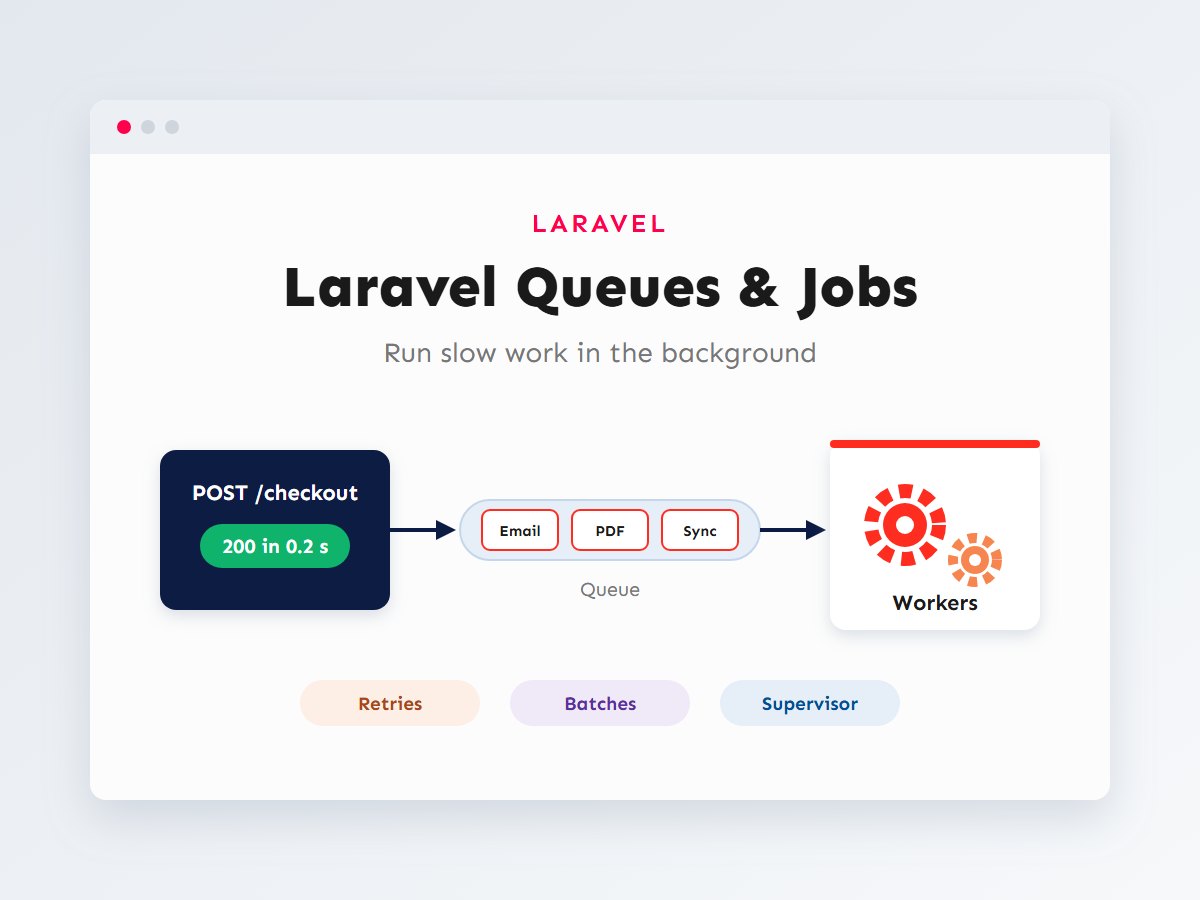

A customer places an order and your app needs to send a confirmation email, generate a PDF invoice, notify the warehouse and sync the sale to an accounting system. If all of that runs while the customer waits, the checkout spinner turns for several seconds, and if the accounting API is slow or down, the whole order can fail. That’s a poor experience and a fragile design.
Laravel’s answer is queues. You record the slow work as a job, respond to the user immediately, and let a background worker process the job moments later, retrying automatically if something fails. In this guide I’ll show how queues work, how to write and dispatch jobs, how to handle retries and failures properly, how to batch and chain work, and how to keep workers running reliably in production.
In this article
Why queues make apps faster and more reliable
Compare the same checkout handled two ways. The timings below are illustrative, but the shape is what matters: with a queue, the user’s wait no longer depends on how slow your email provider or PDF generator happens to be today.
Speed is only half the benefit. Queued jobs are retried when they fail, so a temporary outage at your email provider delays an email by a minute instead of losing it. And because work is spread over workers, a sudden spike of orders doesn’t overload your web server.
How Laravel queues work
When you dispatch a job, Laravel serializes it (its class and the data it needs) and stores it in a queue. A worker, a long-running php artisan queue:work process, pulls jobs off the queue and runs their handle() method. If handle() finishes, the job is deleted. If it throws an exception, the job goes back on the queue to be retried later, until it runs out of attempts and lands in the failed_jobs table.
Choosing a queue driver
The queue’s storage is set by QUEUE_CONNECTION in .env. Recent Laravel versions default to database and ship the migration for the jobs, job_batches and failed_jobs tables, so queues work out of the box with MySQL.
| Driver | How it works | Good for |
|---|---|---|
sync | Runs the job immediately, inside the request | Local testing and debugging only |
database | Stores jobs in a MySQL table | Most small and medium apps; no extra services needed |
redis | Stores jobs in Redis, in memory | High volume; pairs with Laravel Horizon for a monitoring dashboard |
Writing and dispatching a job
Generate a job class with Artisan:
php artisan make:job SendOrderToAccounting<?php
// app/Jobs/SendOrderToAccounting.php
namespace App\Jobs;
use App\Models\Order;
use App\Services\AccountingClient;
use Illuminate\Contracts\Queue\ShouldQueue;
use Illuminate\Foundation\Queue\Queueable;
class SendOrderToAccounting implements ShouldQueue
{
use Queueable;
public function __construct(public Order $order)
{
}
public function handle(AccountingClient $accounting): void
{
// Dependencies are injected into handle() by the service container.
$invoiceId = $accounting->createInvoice($this->order);
$this->order->update(['accounting_invoice_id' => $invoiceId]);
}
}Notice that the job receives the whole Order model. Laravel stores only the model’s ID in the queue and fetches a fresh copy from the database when the job runs, so the payload stays small and the data is never stale. Dispatching it is one line:
// In a controller, after the order is saved
SendOrderToAccounting::dispatch($order);

// Run it on a specific queue, a few minutes later
SendOrderToAccounting::dispatch($order)
    ->onQueue('integrations')
    ->delay(now()->addMinutes(5));

// Only dispatch once the surrounding database transaction has committed
SendOrderToAccounting::dispatch($order)->afterCommit();
That last option prevents a classic bug: a worker picks up the job before the transaction that created the order has committed, can’t find the order, and fails. Emails get the same treatment for free: any Mailable that implements ShouldQueue, or any Mail::to($user)->queue(...) call, is sent by a worker instead of during the request.
Retries, backoff and failed jobs
External services fail. A well-written job expects it. Tell Laravel how many attempts to make, how long to wait between them, and what to do if every attempt fails:
<?php
use App\Notifications\AccountingSyncFailed;
use Illuminate\Support\Facades\Notification;

class SendOrderToAccounting implements ShouldQueue
{
    use Queueable;

    public int $tries = 4;

    public int $timeout = 120; // Seconds before the worker kills a stuck job.

    // Wait 10 seconds, then 1 minute, then 5 minutes between attempts.
    public array $backoff = [10, 60, 300];

    public function __construct(public Order $order)
    {
    }

    public function handle(AccountingClient $accounting): void
    {
        // ...
    }

    public function failed(?\Throwable $exception): void
    {
        // Every attempt failed: tell a human.
        Notification::route('mail', 'accounts@example.com')
            ->notify(new AccountingSyncFailed($this->order, $exception));
    }
}Failed jobs stay in the database until you deal with them. These commands are part of my routine after any incident:
php artisan queue:failed              # List failed jobs with their errors
php artisan queue:retry all           # Push them all back onto the queue
php artisan queue:retry 5a8f...       # Retry one by its ID
php artisan queue:forget 5a8f...      # Delete one
php artisan queue:prune-failed --hours=168   # Clean up entries older than a week
Make jobs safe to run twice
A job can run more than once: a worker might crash after the work was done but before the job was deleted. Design jobs to be idempotent. Check whether the invoice already exists before creating it, use updateOrCreate() instead of create(), and pass an idempotency key to payment APIs that support one.
Preventing duplicates and overload
Two more tools keep jobs well-behaved. Implementing ShouldBeUnique stops the same job being queued twice while one is still waiting, which is useful when a “sync this product” button gets clicked five times. Job middleware controls how jobs run, for example never processing two jobs for the same order at once, or respecting a third-party API’s rate limit:
<?php
use Illuminate\Contracts\Queue\ShouldBeUnique;
use Illuminate\Queue\Middleware\RateLimited;
use Illuminate\Queue\Middleware\WithoutOverlapping;

class SyncProductStock implements ShouldQueue, ShouldBeUnique
{
    use Queueable;

    public function __construct(public Product $product)
    {
    }

    // One pending job per product.
    public function uniqueId(): string
    {
        return (string) $this->product->id;
    }

    public function middleware(): array
    {
        return [
            new WithoutOverlapping($this->product->id), // Never run two at once for this product.
            new RateLimited('supplier-api'),           // Uses a RateLimiter::for('supplier-api') definition.
        ];
    }
}
Chains and batches
Some work has to happen in order; other work can happen all at once. Laravel handles both.
Chains: one after another
In a chain, each job only runs if the previous one succeeded. If one fails, the rest are skipped:
use Illuminate\Support\Facades\Bus;

Bus::chain([
    new GenerateInvoicePdf($order),
    new EmailInvoiceToCustomer($order),
    new SendOrderToAccounting($order),
])->dispatch();
Batches: many at once, with progress
Batches are perfect for imports. Split a large CSV into chunks, process the chunks in parallel across your workers, and get callbacks when everything finishes. Jobs in a batch use the Batchable trait:
<?php
// app/Jobs/ImportProductChunk.php
use Illuminate\Bus\Batchable;

class ImportProductChunk implements ShouldQueue
{
    use Batchable, Queueable;

    public function __construct(public array $rows)
    {
    }

    public function handle(): void
    {
        if ($this->batch()?->cancelled()) {
            return;
        }

        foreach ($this->rows as $row) {
            Product::updateOrCreate(
                ['sku' => $row['sku']],
                ['name' => $row['name'], 'price' => $row['price']],
            );
        }
    }
}

// Dispatching the import
use Illuminate\Bus\Batch;

$jobs = collect($rows)->chunk(500)
    ->map(fn ($chunk) => new ImportProductChunk($chunk->values()->all()));

$batch = Bus::batch($jobs)
    ->name('Product import')
    ->then(fn (Batch $batch) => $import->markComplete())
    ->catch(fn (Batch $batch, \Throwable $e) => report($e))
    ->dispatch();

// Later, for a progress bar
Bus::findBatch($batch->id)->progress(); // 0 to 100
Testing queued work
You don’t want tests sending real emails or calling a real accounting API. Laravel’s fakes record what would have been dispatched so you can assert on it, and you can test the job’s own logic separately by calling handle() directly:
<?php
use App\Jobs\SendOrderToAccounting;
use App\Models\Order;
use Illuminate\Support\Facades\Queue;

it('queues the accounting sync when an order is placed', function () {
    Queue::fake();

    $this->post('/checkout', [/* valid checkout data */])->assertRedirect();

    Queue::assertPushed(SendOrderToAccounting::class, function ($job) {
        return $job->order->status === 'paid';
    });
});

it('stores the invoice id returned by the accounting service', function () {
    $order = Order::factory()->create();

    $client = Mockery::mock(\App\Services\AccountingClient::class);
    $client->shouldReceive('createInvoice')->once()->andReturn('INV-1001');

    (new SendOrderToAccounting($order))->handle($client);

    expect($order->fresh()->accounting_invoice_id)->toBe('INV-1001');
});
Bus::fake() does the same for chains and batches, with Bus::assertChained() and Bus::assertBatched().
Running workers in production
Locally, php artisan queue:work in a terminal is enough. In production, workers must start automatically and restart if they crash. The standard tool on Linux servers is Supervisor. This configuration, adapted from the Laravel documentation, keeps four workers running:
# /etc/supervisor/conf.d/laravel-worker.conf
[program:laravel-worker]
process_name=%(program_name)s_%(process_num)02d
command=php /var/www/app/artisan queue:work --sleep=3 --tries=3 --max-time=3600
autostart=true
autorestart=true
stopasgroup=true
killasgroup=true
user=www-data
numprocs=4
redirect_stderr=true
stdout_logfile=/var/www/app/storage/logs/worker.log
stopwaitsecs=3600
sudo supervisorctl reread
sudo supervisorctl update
sudo supervisorctl start "laravel-worker:*"Three details matter more than they look:
- Workers keep your code in memory. After every deployment, run
php artisan queue:restartso workers finish their current job and reload the new code. Forget this and workers keep running last week’s version. --max-timerecycles workers every hour, which keeps memory leaks from building up.stopwaitsecsshould be longer than your longest job, so Supervisor doesn’t kill a worker in the middle of an import.
I include these steps in every deployment checklist; see deploying Laravel to production for the full list. If you use the Redis driver, Laravel Horizon replaces the hand-written worker configuration with a dashboard showing throughput, wait times and failed jobs.
Real-world use cases
Once you start thinking in jobs, you’ll see candidates everywhere. These are the ones I queue in almost every project:
- Emails and notifications: order confirmations, password resets, admin alerts.
- Incoming webhooks: verify the signature, store the payload, dispatch a job and return
200within milliseconds. Payment and shipping providers retry webhooks that respond slowly, which can cause duplicate processing. - Imports and exports: CSV product imports in batches, large reports generated in the background and emailed as a download link.
- Syncing with other systems: pushing orders to accounting, stock levels to a WooCommerce or Shopify store, contacts to a CRM. My guide on syncing with the WooCommerce REST API shows the other end of such an integration.
- Media processing: resizing uploaded images and generating PDFs.
Key takeaways
- Anything slow or dependent on another service belongs in a queued job, not in the request.
- The database driver works out of the box with MySQL; move to Redis and Horizon when volume grows.
- Set
$tries,$backoffand$timeout, implementfailed(), and make jobs idempotent. - Use chains for ordered steps and batches for large parallel work like imports.
- Run workers under Supervisor and always
queue:restartafter deploying.
Queues are often the difference between an app that feels instant and one that times out under load. If your Laravel application has slow pages, unreliable integrations or imports that never finish, get in touch and I can help move that work into the background properly. If you’re just getting started, read building a REST API with Laravel and Sanctum next.