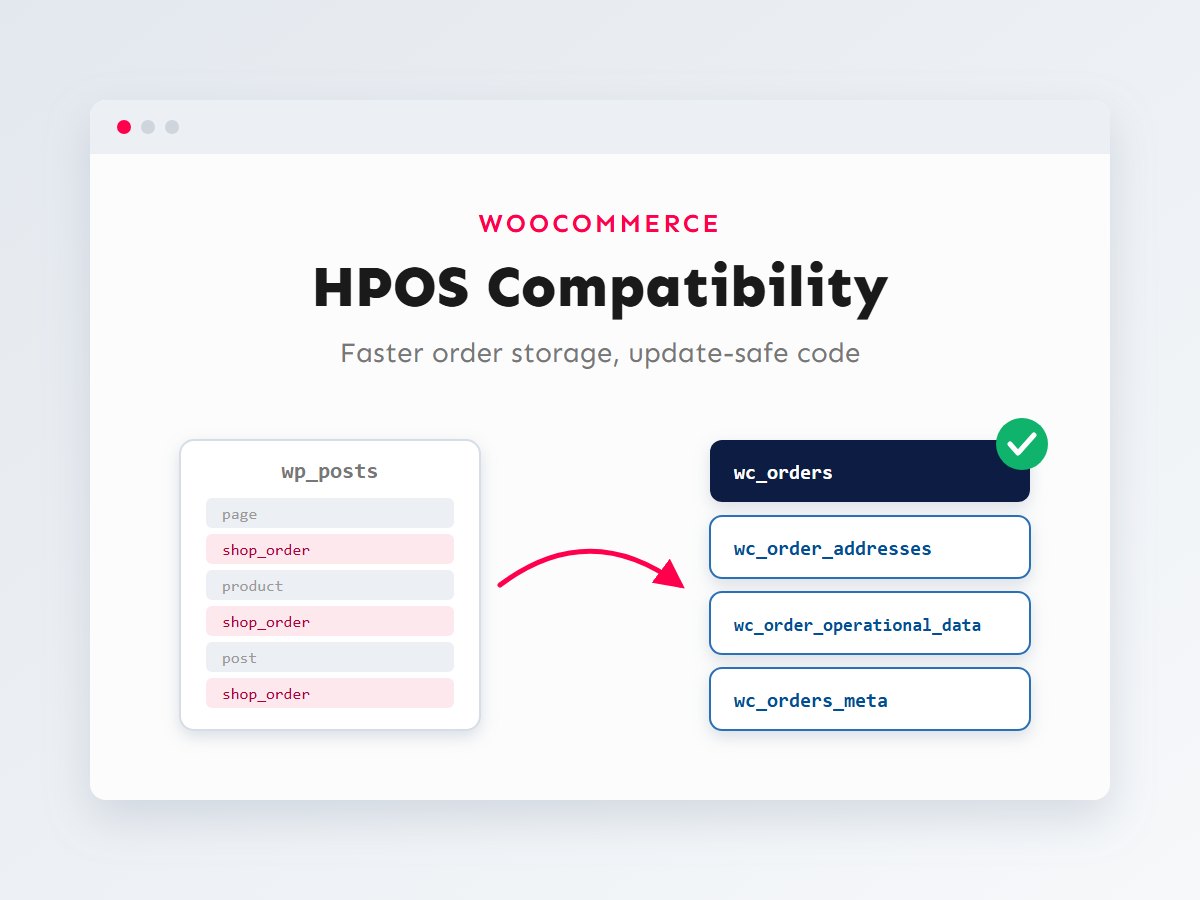

For most of its history, WooCommerce stored orders as a kind of WordPress post. Every order lived in the same wp_posts table as your pages and products, and every order detail (billing email, totals, payment method) was a separate row in wp_postmeta. It worked, but on busy stores those tables grew enormous and order queries got slow.
High-Performance Order Storage (HPOS) fixes that by moving orders into dedicated tables designed for them. It has been the default for new WooCommerce installations since version 8.2, and existing stores can switch over once their code and extensions are compatible. If you maintain a WooCommerce store, a custom plugin or a theme with order-related code, this guide explains what changed, what breaks, and exactly how to update your code. I’ll show the old and new patterns side by side.
In this article
What HPOS changes in the database
With HPOS enabled, orders no longer live in the posts tables. WooCommerce uses four tables of its own: one row per order in wc_orders, addresses in wc_order_addresses, internal flags in wc_order_operational_data, and any extra (extension) data in wc_orders_meta.
wp_wc_orders.)The benefits are practical: fewer, smaller and better-indexed tables for order queries, a lighter wp_posts table for everything else, and an orders screen that stays responsive as the store grows. If your store is slow in general, HPOS is one of the structural fixes I describe in speeding up a slow WooCommerce store.
Why some code breaks
WooCommerce has had a proper CRUD API (objects like WC_Order, functions like wc_get_order()) for years. Code that uses it doesn’t care where orders are stored: WooCommerce’s data store reads from whichever tables are active. The code that breaks is code that went around the API and talked to the posts tables directly.
Under HPOS, those shortcuts either read nothing (the order isn’t in wp_posts any more), read stale data (if compatibility sync is on, the post copy may lag), or write data that WooCommerce never sees. The usual culprits are:
get_post_meta(),update_post_meta()andadd_post_meta()with an order ID.get_post( $order_id )orwp_update_post()on orders.WP_Queryorget_posts()with'post_type' => 'shop_order'.- Direct SQL against
wp_postsorwp_postmetafor order data. - Post-specific hooks such as
save_post_shop_order, and admin hooks tied to the oldedit.php?post_type=shop_orderscreen.
Declaring compatibility
WooCommerce checks every active plugin before letting a store switch to HPOS. A plugin that doesn’t say anything is treated as incompatible and can block the switch. Once your code is updated, declare compatibility in the main plugin file:
<?php
/**
 * Plugin Name: Acme Order Tools
 */

add_action(
	'before_woocommerce_init',
	function () {
		if ( class_exists( \Automattic\WooCommerce\Utilities\FeaturesUtil::class ) ) {
			\Automattic\WooCommerce\Utilities\FeaturesUtil::declare_compatibility(
				'custom_order_tables', // The HPOS feature key.
				__FILE__,              // Must be the main plugin file.
				true
			);
		}
	}
);
Two details catch people out: the call must run on before_woocommerce_init (later is too late), and __FILE__ must point to the main plugin file. If you put the declaration in an included file, pass the main file’s path instead. Only declare compatibility after you’ve actually updated and tested the code; the declaration is a promise, not a fix.
Reading and writing order data
This is the change you’ll make most often. Load the order object, use its getters and meta methods, and call save() when you’ve finished writing:
<?php
// Before: only works with legacy (posts) storage.
$tracking = get_post_meta( $order_id, '_acme_tracking_number', true );
update_post_meta( $order_id, '_acme_tracking_number', $number );
$email = get_post_meta( $order_id, '_billing_email', true );

// After: works with HPOS and legacy storage.
$order = wc_get_order( $order_id );
if ( $order ) {
	$tracking = $order->get_meta( '_acme_tracking_number' );
	$email    = $order->get_billing_email(); // Core fields have real getters.

	$order->update_meta_data( '_acme_tracking_number', $number );
	$order->save(); // Nothing is written until save().
}
Notice the difference between core fields and custom data. Billing email, totals, status and dates are real columns under HPOS, so use the matching getter (get_billing_email(), get_total(), get_status()) rather than reading their old meta keys. Your own custom data uses get_meta(), update_meta_data() and delete_meta_data().
The same applies to hooks. Instead of save_post_shop_order, use WooCommerce’s own order events, which fire regardless of storage:
<?php
// Runs when an order is created, whichever storage is active.
add_action(
	'woocommerce_new_order',
	function ( $order_id, $order ) {
		// $order is a WC_Order object.
	},
	10,
	2
);

// React to status changes rather than to generic "post saved" events.
add_action(
	'woocommerce_order_status_completed',
	function ( $order_id ) {
		$order = wc_get_order( $order_id );
		// ... send to fulfilment, sync to an ERP, etc.
	}
);
Querying orders
Replace WP_Query and get_posts() for orders with wc_get_orders(). It accepts similar arguments, including a meta_query for your custom fields, and returns order objects:
<?php
// Before: WP_Query on the shop_order post type (legacy only).
$query = new WP_Query(
	array(
		'post_type'   => 'shop_order',
		'post_status' => 'wc-processing',
		'meta_key'    => '_acme_synced',
		'meta_value'  => 'no',
	)
);

// After: wc_get_orders() works with both storage types.
$orders = wc_get_orders(
	array(
		'status'     => array( 'wc-processing' ),
		'limit'      => 50,
		'orderby'    => 'date',
		'order'      => 'ASC',
		'meta_query' => array(
			array(
				'key'   => '_acme_synced',
				'value' => 'no',
			),
		),
	)
);

foreach ( $orders as $order ) {
	// Each item is a WC_Order.
}
If you genuinely need raw SQL for a report, check which storage is active and query the right tables. WooCommerce provides a helper for that:
<?php
use Automattic\WooCommerce\Utilities\OrderUtil;

if ( OrderUtil::custom_orders_table_usage_is_enabled() ) {
	// Query {$wpdb->prefix}wc_orders and wc_orders_meta.
} else {
	// Legacy: query wp_posts / wp_postmeta.
}
Admin screens, columns and meta boxes
Under HPOS, orders are managed on a different admin screen (admin.php?page=wc-orders instead of edit.php?post_type=shop_order). Custom columns and meta boxes need to target it. The cleanest approach is to register for both, so your code works on any store:
<?php
// Add an "Acme sync" column to the orders list (HPOS and legacy screens).
function acme_add_order_column( $columns ) {
	$columns['acme_sync'] = __( 'Acme sync', 'acme' );
	return $columns;
}
add_filter( 'manage_woocommerce_page_wc-orders_columns', 'acme_add_order_column' ); // HPOS.
add_filter( 'manage_edit-shop_order_columns', 'acme_add_order_column' );            // Legacy.

// HPOS passes the order object; the legacy screen passes the post ID.
add_action(
	'manage_woocommerce_page_wc-orders_custom_column',
	function ( $column, $order ) {
		if ( 'acme_sync' === $column ) {
			echo esc_html( $order->get_meta( '_acme_synced' ) ?: '—' );
		}
	},
	10,
	2
);
add_action(
	'manage_shop_order_posts_custom_column',
	function ( $column, $post_id ) {
		if ( 'acme_sync' === $column ) {
			$order = wc_get_order( $post_id );
			echo esc_html( $order ? ( $order->get_meta( '_acme_synced' ) ?: '—' ) : '—' );
		}
	},
	10,
	2
);

// Meta box on the order edit screen, whichever screen is active.
add_action(
	'add_meta_boxes',
	function () {
		add_meta_box(
			'acme-sync',
			__( 'Acme sync', 'acme' ),
			'acme_render_sync_box', // Receives a WP_Post or a WC_Order.
			wc_get_page_screen_id( 'shop-order' ),
			'side'
		);
	}
);
Inside the meta box callback, accept either type: $order = $object instanceof WP_Post ? wc_get_order( $object->ID ) : $object;. For links to an order, use $order->get_edit_order_url() instead of building a post.php URL by hand.
| Legacy pattern | HPOS-compatible replacement |
|---|---|
get_post_meta( $id, '_key', true ) | wc_get_order( $id )->get_meta( '_key' ) |
update_post_meta() | $order->update_meta_data() + $order->save() |
get_post_meta( $id, '_billing_email', true ) | $order->get_billing_email() |
WP_Query / get_posts() on shop_order | wc_get_orders() |
save_post_shop_order | woocommerce_new_order, woocommerce_update_order, status hooks |
manage_edit-shop_order_columns | Also manage_woocommerce_page_wc-orders_columns |
add_meta_box( …, 'shop_order' ) | wc_get_page_screen_id( 'shop-order' ) |
admin_url( 'post.php?post=' . $id … ) | $order->get_edit_order_url() |
Searching your codebase for shop_order, get_post_meta, update_post_meta, wp_postmeta and save_post finds most of what needs attention. My guide to WordPress hooks is useful background if you’re replacing post hooks with WooCommerce ones.
Switching a live store safely
For an existing store, the switch doesn’t have to be a leap. WooCommerce’s compatibility mode keeps both storage systems in sync, so you can move one step at a time and step back if something misbehaves.
- Update and test the code on staging. Check WooCommerce → Settings → Advanced → Features: it lists any active plugins that haven’t declared compatibility.
- Enable compatibility mode on the live store and let WooCommerce copy existing orders into the HPOS tables in the background.
- Switch the source of truth to HPOS while keeping sync on. Place test orders, check emails, refunds, reports and every integration.
- Turn sync off once you’re confident, which gives you the full performance benefit.
On large stores, WP-CLI is more reliable than the browser for the heavy lifting. WooCommerce provides commands under wp wc hpos:
# Current HPOS and compatibility-mode state, plus pending counts
wp wc hpos status

# How many orders still need syncing?
wp wc hpos count_unmigrated

# Sync in batches (default batch size is 500)
wp wc hpos sync --batch-size=500

# Check both data stores agree; inspect a single order in detail
wp wc hpos verify_data
wp wc hpos diff 1234
As always with store changes, take a full database backup first, and pick a quiet time for the switch. If you’re moving the store to new hosting at the same time, do one change at a time; my WordPress migration guide covers the hosting side.
Key takeaways
- HPOS moves orders from the posts tables into dedicated, indexed order tables.
- Code that uses the CRUD API keeps working; code that touches posts tables directly breaks.
- Use
wc_get_order(), getters,get_meta()/update_meta_data()+save(), andwc_get_orders(). - Support both order screens for columns and meta boxes, then declare compatibility.
- Switch live stores in stages with compatibility mode, so every step is reversible.
Have a custom plugin or theme that’s blocking the switch to HPOS? I can audit the order-related code, update it to the CRUD API and help you migrate the store safely. Get in touch with a list of the plugins that WooCommerce flags.