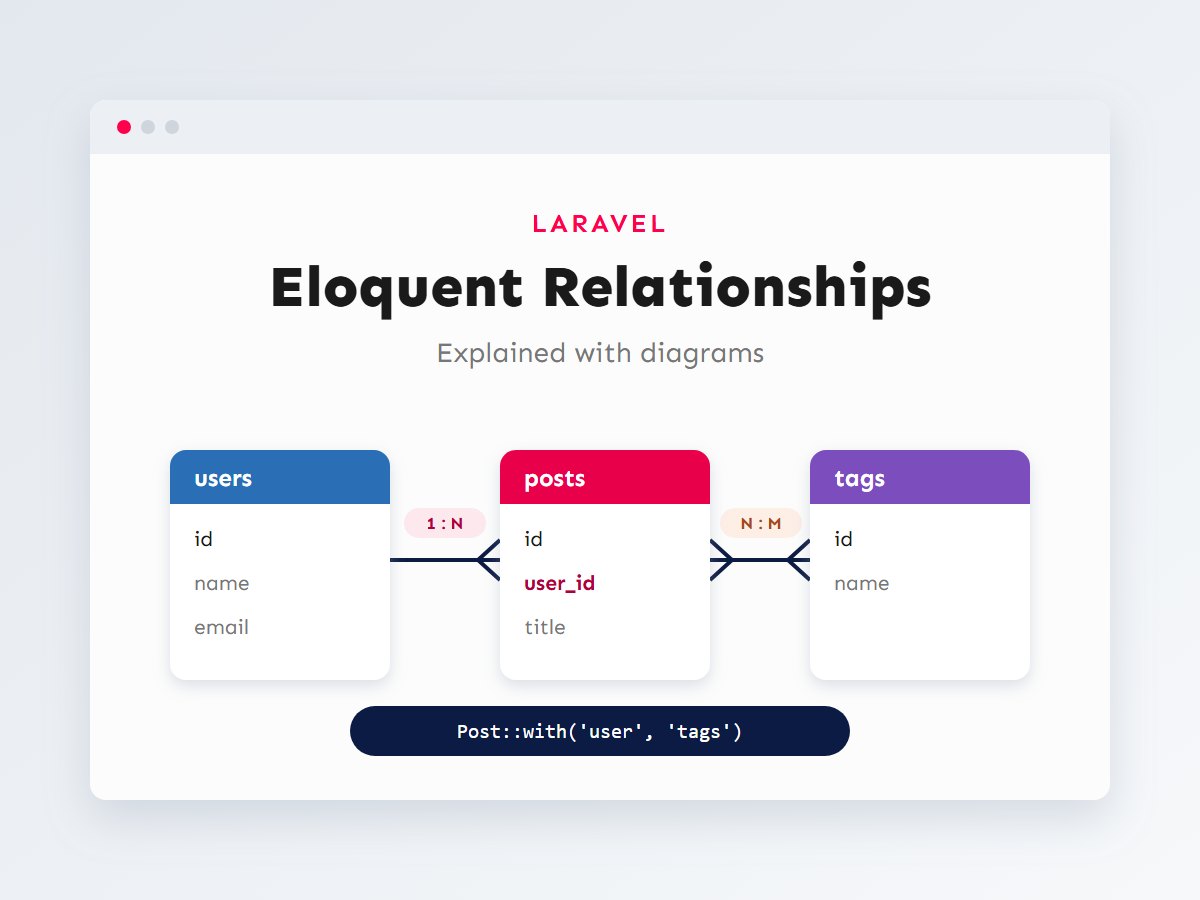

Real data is connected. A customer has orders, an order has products, a product has reviews, and a review belongs to a customer. How you model those connections decides how easy your application is to build, how fast it runs and how safely it handles deletes. In Laravel, those connections are Eloquent relationships, and they are one of the framework’s best features.
This guide explains every common relationship type with a diagram of the tables behind it, the migration that creates them and the model code that connects them. Then we’ll tackle the performance trap that catches almost everyone, the N+1 query problem, and the tools Laravel gives you to avoid it.
In this article
How relationships work under the hood
Eloquent relationships are not magic. They are methods on your model that return a query builder, configured from foreign keys in your tables. If a posts table has a user_id column, a post belongs to a user and a user has many posts. Eloquent guesses the column and table names from conventions (user_id for the User model, post_tag for a pivot between posts and tags), and you can override every guess when your schema is different.
Because relationships are queries, you can use them two ways: as a property ($user->posts) to get the loaded results, or as a method ($user->posts()) to keep building the query, for example $user->posts()->where('published', true)->latest()->get().
One-to-one and one-to-many
Let’s use a small blogging platform as the example throughout. Each user has one profile, each user writes many posts, and posts are tagged with many tags:
The migrations create those foreign keys. foreignId()->constrained() adds the column, an index and a real database constraint, so MySQL refuses a post whose author doesn’t exist:
<?php
Schema::create('profiles', function (Blueprint $table) {
    $table->id();
    $table->foreignId('user_id')->unique()->constrained()->cascadeOnDelete();
    $table->text('bio')->nullable();
    $table->timestamps();
});

Schema::create('posts', function (Blueprint $table) {
    $table->id();
    $table->foreignId('user_id')->constrained()->cascadeOnDelete();
    $table->string('title');
    $table->text('body');
    $table->boolean('published')->default(false);
    $table->timestamps();
});
cascadeOnDelete() means deleting a user deletes their profile and posts at the database level. Choose this deliberately. For orders or invoices you usually want restrictOnDelete() instead, so important records can’t vanish by accident.
The models declare both directions of each relationship:
<?php
// app/Models/User.php
use Illuminate\Database\Eloquent\Relations\HasMany;
use Illuminate\Database\Eloquent\Relations\HasOne;

public function profile(): HasOne
{
    return $this->hasOne(Profile::class);
}

public function posts(): HasMany
{
    return $this->hasMany(Post::class);
}

// app/Models/Post.php (and Profile.php has the same belongsTo)
use Illuminate\Database\Eloquent\Relations\BelongsTo;

public function user(): BelongsTo
{
    return $this->belongsTo(User::class);
}
Using them reads naturally, and creating records through a relationship fills in the foreign key for you:
$user->profile->bio;                    // One profile
$user->posts;                           // Collection of posts
$post->user->name;                      // The author

$user->posts()->create([                // user_id is set automatically
    'title' => 'Hello Eloquent',
    'body'  => '...',
]);
The rule to remember: the model whose table holds the foreign key uses belongsTo. The other side uses hasOne or hasMany.
Many-to-many with a pivot table
A post has many tags and a tag belongs to many posts, so neither table can hold the foreign key. A third pivot table holds pairs of IDs. By convention it is named after both models in alphabetical order, singular: post_tag.
<?php
Schema::create('tags', function (Blueprint $table) {
    $table->id();
    $table->string('name')->unique();
    $table->timestamps();
});

Schema::create('post_tag', function (Blueprint $table) {
    $table->foreignId('post_id')->constrained()->cascadeOnDelete();
    $table->foreignId('tag_id')->constrained()->cascadeOnDelete();
    $table->primary(['post_id', 'tag_id']); // No duplicate pairs.
    $table->timestamps();
});

// app/Models/Post.php
public function tags(): BelongsToMany
{
    return $this->belongsToMany(Tag::class)->withTimestamps();
}

// app/Models/Tag.php
public function posts(): BelongsToMany
{
    return $this->belongsToMany(Post::class);
}
Eloquent gives you expressive methods for managing the pivot rows:
$post->tags()->attach([1, 2]);           // Add tags
$post->tags()->detach(2);                // Remove one
$post->tags()->sync([1, 3, 5]);          // Make the list exactly this (ideal for checkbox forms)
$post->tags()->syncWithoutDetaching([7]); // Add without removing others
Pivot tables can carry their own data too. A course_user pivot might store enrolled_at and progress; declare them with ->withPivot('progress', 'enrolled_at') and read them as $course->pivot->progress. When the pivot grows its own behaviour, promote it to a full model (an Enrollment) with ->using(Enrollment::class).
Has-many-through and polymorphic relationships
Two more relationship types solve problems that come up in almost every larger project:
Has-many-through
To list every post written by users from a country, you could loop through users and collect their posts, or let Eloquent write the join:
<?php
// app/Models/Country.php
use Illuminate\Database\Eloquent\Relations\HasManyThrough;

public function posts(): HasManyThrough
{
    return $this->hasManyThrough(Post::class, User::class);
}

// Usage
$country->posts()->latest()->take(10)->get();
Polymorphic relationships
Images, comments, likes and activity logs often attach to several kinds of record. Instead of a separate post_images and user_images table, a polymorphic table stores which model (imageable_type) and which row (imageable_id):
<?php
Schema::create('images', function (Blueprint $table) {
    $table->id();
    $table->string('url');
    $table->morphs('imageable'); // imageable_id + imageable_type + index
    $table->timestamps();
});

// app/Models/Image.php
public function imageable(): MorphTo
{
    return $this->morphTo();
}

// app/Models/Post.php and app/Models/User.php
public function images(): MorphMany
{
    return $this->morphMany(Image::class, 'imageable');
}

// app/Providers/AppServiceProvider.php, inside boot()
use Illuminate\Database\Eloquent\Relations\Relation;

Relation::enforceMorphMap([
    'post' => \App\Models\Post::class,
    'user' => \App\Models\User::class,
]);
The morph map stores short names like post instead of full class names such as App\Models\Post, so renaming or moving a model never breaks existing rows. Polymorphic tables can’t have real foreign key constraints, which is the trade-off for their flexibility: clean up their rows yourself when the parent is deleted.
The N+1 problem and eager loading
This is the single most common performance problem I find in Laravel code reviews. It looks completely innocent:
{{-- Controller: $posts = Post::latest()->take(50)->get(); --}}
@foreach ($posts as $post)
    <h2>{{ $post->title }}</h2>
    <p>By {{ $post->user->name }}</p>   {{-- One extra query per post! --}}
@endforeach
One query loads the 50 posts. Then, because each post’s author is loaded lazily the first time you touch $post->user, the loop fires 50 more queries. That is 1 + N queries, and it grows with every post on the page. Eager loading fetches all the authors in a single extra query instead:
$posts = Post::with('user')->latest()->take(50)->get();       // 2 queries in total

$posts = Post::with(['user', 'tags'])->latest()->get();        // Several relationships
$posts = Post::with('user.profile')->get();                    // Nested: author and their profile
$posts = Post::with('user:id,name')->get();                    // Only the columns you need

$post->load('tags'); // Eager load after the fact, on a model you already haveThe best defence is to make lazy loading impossible to miss during development. Add this to AppServiceProvider::boot() and Laravel throws an exception whenever a relationship is lazy loaded, while staying silent in production:
use Illuminate\Database\Eloquent\Model;

Model::preventLazyLoading(! $this->app->isProduction());
The same thinking applies in WordPress, where a loop calling get_post_meta() or get_the_terms() per post can cause the same pattern. I cover that side in mastering WP_Query, and index design (which makes the remaining queries fast) in MySQL indexes and query optimization.
Counting and filtering by relationships
Often you don’t need related records, only facts about them. Loading every comment just to call count() wastes memory. Let the database do the work:
// Adds a comments_count attribute using a subquery
$posts = Post::withCount('comments')->get();
echo $posts->first()->comments_count;

// Count with a condition, under a custom name
$users = User::withCount([
    'posts as published_posts_count' => fn ($q) => $q->where('published', true),
])->get();

// Sums and averages work the same way
$users = User::withSum('orders', 'total')->get();   // orders_sum_total

// Only posts that have at least one comment
$posts = Post::has('comments')->get();

// Only posts tagged "laravel"
$posts = Post::whereHas('tags', fn ($q) => $q->where('name', 'laravel'))->get();

// Users who have never written a post
$users = User::doesntHave('posts')->get();
Watch your query log
During development, Laravel Debugbar or Laravel Telescope show every query a page runs. Any page with dozens of near-identical queries is a sign of a missing with() or withCount().
Common relationship mistakes
These are the issues I fix most often when reviewing Eloquent code. Each one is small, and each one causes real bugs or slow pages.
Counting a loaded collection instead of the database
$user->posts->count() (property) loads every post into memory and then counts them in PHP. $user->posts()->count() (method) runs a single SELECT COUNT(*). The difference is two characters and, on a user with thousands of posts, a lot of memory. The same applies to exists(), sum() and max().
Crashing on a missing related record
If a post’s author was deleted (or the relationship is optional), $post->user->name throws an error because $post->user is null. Use the null-safe operator, $post->user?->name, or give the relationship a default model so templates never need to check:
public function user(): BelongsTo
{
    return $this->belongsTo(User::class)->withDefault([
        'name' => 'Guest author',
    ]);
}
Forgetting the inverse relationship
Defining User::posts() but not Post::user() works until someone needs to go the other way, and then they write a manual query. Always define both directions; it takes thirty seconds and keeps the rest of the codebase consistent.
Keeping parent timestamps stale
When a comment is added, should the post’s updated_at change, for example to bust a cache or sort by “recently active”? Add protected $touches = ['post']; to the Comment model and Eloquent updates the parent’s timestamp automatically whenever a comment is saved.
Relationship cheat sheet
| Relationship | Example | Foreign key lives in | Inverse |
|---|---|---|---|
hasOne | User → Profile | profiles.user_id (unique) | belongsTo |
hasMany | User → Posts | posts.user_id | belongsTo |
belongsToMany | Post ↔ Tags | Pivot post_tag | belongsToMany |
hasManyThrough | Country → Posts | users.country_id + posts.user_id | (none needed) |
morphMany | Post / User → Images | images.imageable_* | morphTo |
morphToMany | Posts / Videos ↔ Tags | Pivot taggables | morphedByMany |
Key takeaways
- Relationships are defined by foreign keys. The model whose table holds the key uses
belongsTo. - Use
foreignId()->constrained()for real database integrity, and choose cascade or restrict on delete deliberately. - Many-to-many needs a pivot table;
sync()is ideal for forms with checkboxes. - Use a morph map with polymorphic relationships so class renames never break stored data.
- Eager load with
with(), count withwithCount(), and turn onpreventLazyLoading()in development to catch N+1 queries early.
A well-designed data model is the foundation everything else rests on, and it is much cheaper to get right before launch than after. If you are planning a Laravel application, or an existing one is slowing down as data grows, let’s talk. New to Laravel from WordPress? Start with Laravel for WordPress developers.